How to resolve OAuth challenges within AI solutions.
Introduction
Over six weeks our AI team at Mission Cloud shipped an AI agent that lets users query sensitive, permission-controlled data in plain language. The problem that nearly stopped us had nothing to do with prompts or latency. It was identity: how to let an agent act for a user without handing it the keys to everyone else's data.
The fix turned out to be a pattern, not a workaround. The agent carries two tokens, each used at a different border. One proves who the user is on the way in. A second, scoped to that same user, authorizes every action on the way out. We call it the Dual-Token Pattern, and the rest of this post is how we arrived at it and what broke along the way.
Mechanically, it works across two trust boundaries. The process begins with Inbound Authentication, where the end-user validates their identity with an OIDC provider and presents a standard Token to the agent runtime. The runtime validates this platform access token. Next, for Outbound Authentication, the agent initiates an impersonation flow. It exchanges the user's identity for a second, separate, user-scoped access token from the destination service. This crucial second token ensures every tool call respects the user's existing permissions, preventing the AI from accessing unauthorized data.
Customer context
The customer’s platform is a Qlik-powered life sciences analytics SaaS product. It serves customers with strict per-user data access requirements, necessitating a robust identity solution. The business driver for this architecture was the need to integrate a secure natural language interface, which would allow users to query their highly sensitive, permission-controlled data using AI.
Solution architecture
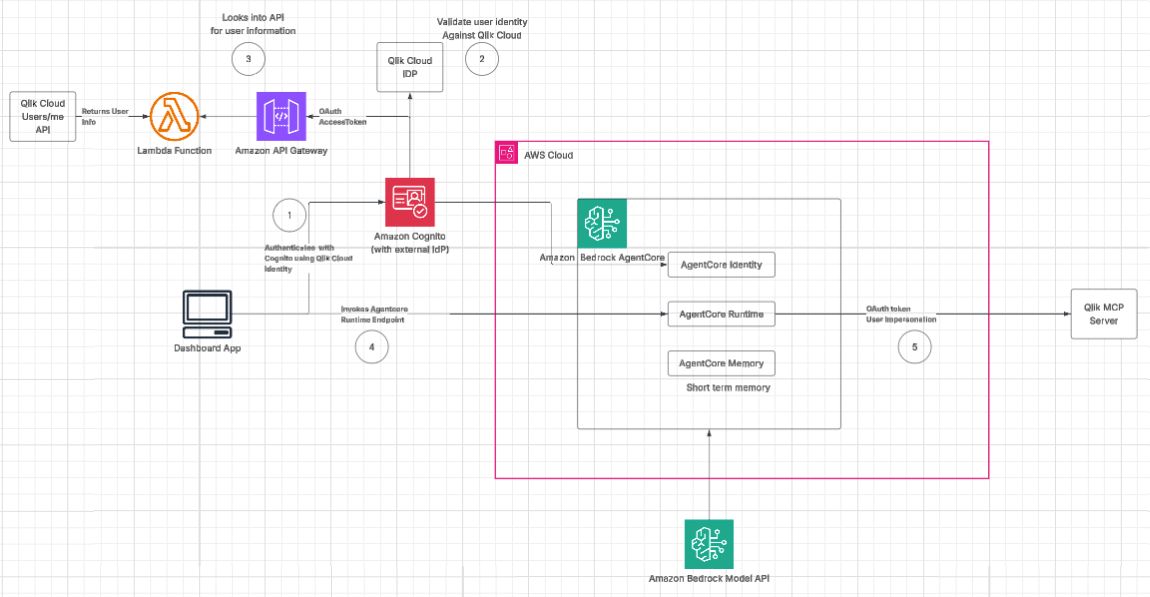
End-to-end view: User → React chat → AgentCore → Qlik MCP
The flow starts in the browser: a React chat UI embedded in the Dashboard. From there, requests traverse two distinct trust boundaries—one into the agent platform, and one out to the data platform.
(1) Inbound boundary (User → Agent): The user signs in through Amazon Cognito, configured with Qlik Cloud as an external IdP. Cognito hands the app a standard set of tokens (ID/access/refresh) that represent the user’s authenticated session. The React app uses those tokens to call the AgentCore Runtime endpoint.
(2–3) Identity validation & user context: Because Qlik is the upstream identity source, we validate and enrich user context by looking up the user against Qlik Cloud. In the diagram, that happens via API Gateway → Lambda → Qlik Cloud /users/me, returning authoritative user info.
(4) Agent invocation: With inbound auth satisfied, the app invokes Amazon Bedrock AgentCore Runtime. Inside AWS, the agent uses AgentCore Identity, Runtime, and Memory (short-term) to orchestrate the conversation and tool calls. The agent can also call the Bedrock Model API as part of its reasoning and response generation.
(5) Outbound boundary (Agent → Qlik MCP): When the agent needs to fetch or act on Qlik data via the Qlik MCP Server, it crosses a second, separate boundary. Qlik enforces per-user authorization, which heavily influences how outbound tokens must work. Here, the agent uses an OAuth client_id and client_secret to mint an impersonation token for the authenticated user. Those credentials live in AWS Secrets Manager.
Why Bedrock AgentCore
Amazon Bedrock AgentCore served as the robust backbone for this solution, excelling in three critical areas: runtime orchestration, inbound identity management, and efficient MCP tool routing. By leveraging AgentCore, we offloaded the complexities of infrastructure scaling and operational management, allowing the team to focus on business logic. The solution utilized Strands agents to manage specialized tasks, where AgentCore bridged the user’s platform identity with the agentic runtime. Specifically, the architecture was designed so that only one specialized agent, the MCP Agent, invokes the Qlik MCP server for tool usage. This targeted routing ensured that sensitive data operations remained centralized and secure, while AgentCore’s orchestration layer maintained the overall flow and state of the multi-turn conversation without the overhead of manual session management.
AgentCore Identity: fine-grained access by default
Amazon Bedrock AgentCore Identity is purpose-built to ensure every tool call an agent makes respects the authenticated user's permissions. It provides a managed layer that maps inbound user identity directly to outbound tool authorization, handling the credential lifecycle, scope enforcement, and audit trail without custom token plumbing. For most integrations, this is the recommended starting point for bridging user identity to downstream services.
The machine-to-machine (M2M) gap: what we expected outbound identity to look like—and why it didn’t
In this engagement, however, AgentCore Identity's standard outbound flow hit a wall. The initial expectation was straightforward: the agent would use a machine identity to call Qlik on behalf of the application — a classic client credentials (M2M) flow where the agent gets a platform token and uses it to call downstream APIs.
But Qlik (and many SaaS data platforms) don’t allow M2M for user-scoped resources in a way that preserves user permissions end-to-end. If the downstream system can’t mint an app-only token that is also constrained to the user’s entitlements, you face a hard choice: either over-privilege the agent (bad), or lose the per-user permission model (worse). This “M2M gap” is likely to show up across MCP integrations today because MCP makes tools easy to call, but it doesn’t magically erase the downstream platform’s authorization model.
The impersonation workaround: preserving the per-user permission model
The solution was to lean into what Qlik does support: user impersonation tokens. Instead of pretending the agent is a user, we make the agent carry two tokens and use each only at the right boundary:
- The Cognito token is used to enter the agent platform (inbound).
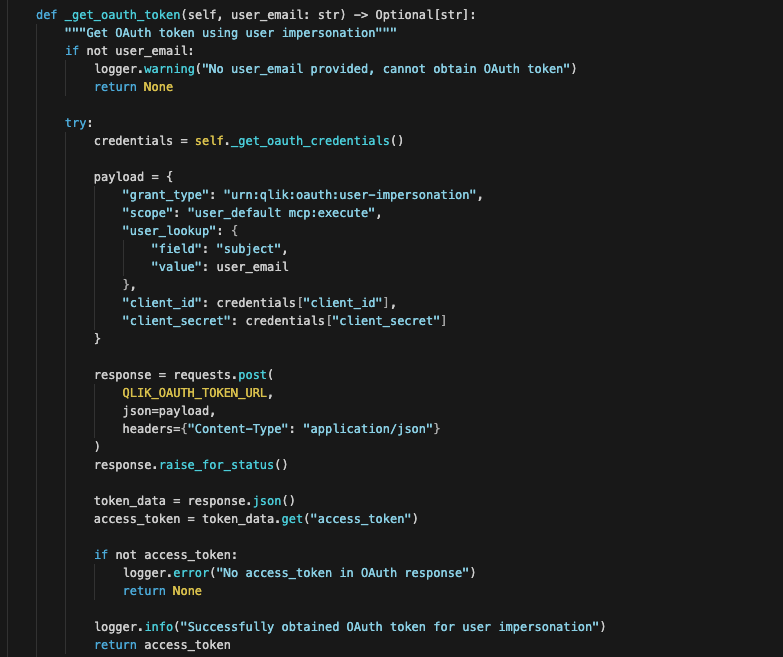
- A short-lived impersonation token is minted for the user and used only when calling Qlik MCP (outbound).
Mechanically, the agent internally mints the short-lived impersonation token based on the user information from the inbound authentication, and then uses that token to call Qlik MCP so Qlik evaluates requests exactly as if the user made them directly.
Trade-offs still exist with this approach. Impersonation introduces token minting overhead, careful logging/auditing requirements, and stricter hygiene (no storing outbound tokens in long-lived memory, no cross-user caching, short TTLs). But, it preserves the thing production multi-tenant platforms require most: authorization remains per-user, end-to-end.
POC-to-MVP in 6 weeks
The engagement was delivered in two distinct phases over a six-week timeline to ensure functional validation before production hardening.
During Phase 1: Proof of Concept (Weeks 1–2), the goal was to validate that the Qlik MCP Server met business needs using a minimal stack with hardcoded credentials and a single-user agent. This phase derisked the integration by answering critical questions about tool availability, prompt engineering, and latency.
Phase 2: Minimum Viable Product (Weeks 3–6) pivoted to production readiness, focusing on multi-user authentication through Cognito and Qlik OIDC federation, user impersonation for secure data access, and the development of a portable React module for application embedding.
Lessons learned — what the docs don't tell you
The integration process revealed several non-obvious challenges and architectural requirements. While OIDC is a standard, non-standard OIDC implementations often require custom code. For instance, a Lambda proxy was necessary to rename Qlik's "subject" claim to the "sub" claim required by Cognito. We also identified vendor-specific authorization gaps where M2M flows fail to preserve user-scoped permissions. This led to the validation of user impersonation as a critical architectural bridge, allowing the agent to carry dual tokens to respect existing data boundaries.
The repeatable pattern
For teams integrating an AI agent with a SaaS platform that requires per-user permissions, a clear identity decision tree is essential. Determine these three things upfront:
- Do you have a standard OAuth setup?
- Is the implementation fully standardized?
- Does the outbound API (like an MCP server) inherently carry over user permissions?
Leveraging AgentCore Identity requires managing two authentication fronts:
- Inbound Access: While this typically requires a token and a standard OIDC endpoint, using a service like Amazon Cognito to federate the customer’s Identity Provider (IdP) is an excellent alternative if a direct flow is unavailable.
- Outbound Access: If the external service supports the same authentication, you may attempt token reuse; otherwise, you can initiate a secondary authentication flow or adopt M2M alternatives like user impersonation to ensure per-user authorization boundaries are preserved.
The biggest challenge in this project was proving, on every call, that the agent acts as one specific user and no one else. AgentCore Identity carried the inbound half of that cleanly. The outbound half is where teams get stuck. A machine credential wants to flatten per-user permissions, and that is where the second token earns its place. Mint a short-lived, user-scoped token for each outbound call, keep the credentials that mint it out of the agent's memory, and the platform enforces the same boundaries it always has.
If you are building toward this, work through the three questions above before you write a line of integration code. They tell you whether the managed flow will hold or whether you need the impersonation path, and knowing that early saves the weeks we spent finding out. This is the kind of gap we help teams cross, so if your agent is hitting the same wall, the Mission Cloud team is happy to help.
.png)
.png)